


NovelMaster
2.7782.00 Reviews
App Specs
- Version
- 3.2.0
- Updated On
- License
- Free
- Downloads
- 500,000+
- Developer
- SUNGAI PTE.LTD
- Categories
- Books & Reference
- Platform
- Android
Screenshots

 Analysis by AppCompare
If you’re anything like me, always on the lookout for the next great escape into a world of stories, then you might want to check out NovelMaster. This app is a free reading app from SUNGAI PTE.LTD, aimed at people who want stories close at hand without much setup. Its Teen age rating makes it suitable for older children and adults, though I’d still treat that as a broad guide rather than a judgment about every individual story. Let’s dive into what makes this app tick, and whether it’s worth the download.
The first-week appeal of bite-sized reading
NovelMaster is built around short stories and a simple interface, which gives it an easy first-week appeal: there is little ceremony between opening the app and settling into a quick reading session. I find that format especially useful when I have ten spare minutes rather than the focus for a full-length novel. It can turn a wait for an appointment or a quiet break into a small, self-contained reading habit.
That convenience is also the right way to judge its promise. If you expect a carefully curated digital library of classics and celebrated new releases, this is not the same proposition as a general ebook store or a library app. Short-form reading works best when you want an easy entry point, not when you need a specific title, a deep catalogue of established literature, or a long book to follow over several weeks.
Immersive Storytelling at Your Fingertips
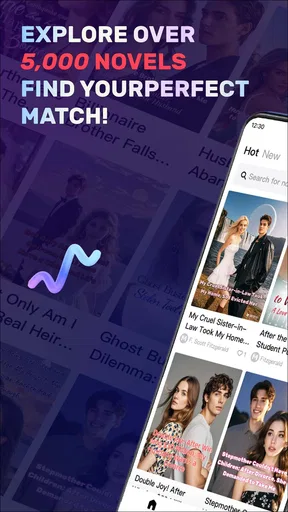
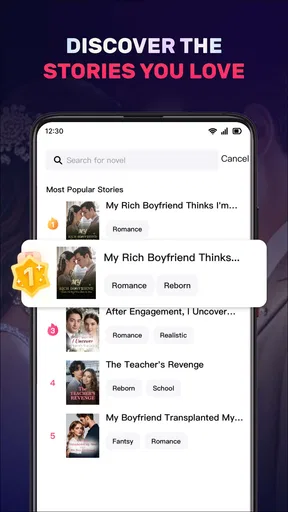
NovelMaster offers a pretty vast collection of novels, ranging from classic literature to contemporary bestsellers. The first thing you’ll notice when you open the app is its clean, intuitive interface. It’s super easy to navigate, and the categories are clearly laid out, making it a breeze to find your next read. Whether you’re into romance, mystery, sci-fi, or fantasy, there’s something here for everyone.
Choosing a reading routine that lasts
After the novelty wears off, the useful question is whether opening the app becomes a repeatable habit. Short stories are well suited to a regular, low-pressure slot: I might read one while having coffee, or use a brief pause between errands instead of scrolling through unrelated feeds. The shorter format lowers the commitment, but it also means I would not choose this as my only reading app if my main goal were to stay immersed in one lengthy story with a carefully paced plot.
A practical way to test its fit is to give it a specific place in your day for a week, then notice whether the reading itself draws you back. If you keep opening it only because you are bored, rather than because the stories hold your attention, that is useful information. The app’s 2.1 average from around 3,600 ratings and roughly 693 reviews points to a mixed reception, so I would try it with modest expectations rather than assume the experience will suit every reader.
Features That Stand Out
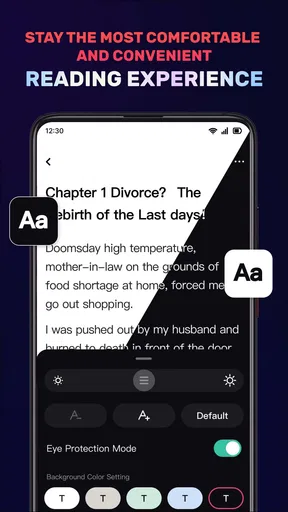
One of the features I absolutely love is the personalization the app offers. You can tailor your reading experience by adjusting the font size, background color, and even the screen brightness. For night owls like me, the night mode is a blessing, making it easy on the eyes during those late-night reading sessions.
Worth Reading Before You Choose

EA SPORTS FC Mobile 26 Is a Bigger Football Game, but It Takes Time

Flipboard Shows What News Apps Must Do Beyond the Feed

Switching to Android Auto Means Rethinking Your Driving Routine

Google Calendar Makes a Crowded Week Easier to Manage

Ludo King Makes the Most of the Minutes Between Plans

Baby Panda World Brings Quick Play to Modern Phones, but Its Game Library Feels Busy
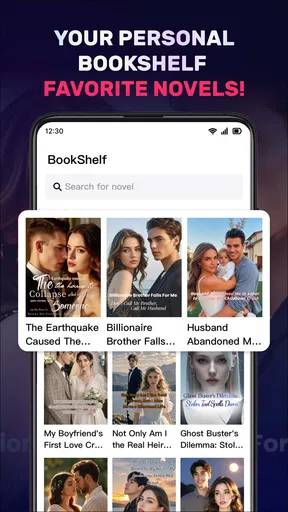
The app also includes a nifty bookmarking feature. Gone are the days of dog-earing pages or losing your spot. With just a tap, you can mark where you left off, and the app will pick up right where you left. It’s small details like these that really enhance the user experience.
Small habits that make the reader more useful
Those reading controls are most valuable when I set them once for a real situation rather than repeatedly tweaking them. For example, choosing a comfortable font size and a softer background before a commute means I can spend a short ride reading instead of adjusting the screen at every stop. A bookmark is similarly handy if an interruption arrives mid-story; I can pause without relying on memory to find my place again.
For a more deliberate routine, I’d use the short format as a sampler: read a story when I have limited time, then decide whether the app’s tone and selection are worth returning to. That is a different workflow from buying an ebook after reading reviews or borrowing a known title from a library catalogue. NovelMaster is better suited to browsing and quick sessions than to a reader who arrives with a precise book already in mind.
Community and Interaction
Another awesome aspect of NovelMaster is its community features. You can join book clubs, participate in discussions, and even leave reviews for the books you’ve read. It’s a great way to connect with fellow book lovers and exchange recommendations. Plus, seeing what others are saying about a book can help you decide whether it’s worth diving into.
I also appreciate the integration of a social aspect within the app. You can follow other users with similar tastes, which adds a social network vibe to your reading journey. It’s like having a virtual book club in your pocket!
When social reading helps—and when it distracts
For someone who enjoys talking through a story, the discussion side can make a short read feel less disposable. I’d use it after finishing a piece, when I can compare reactions without letting other readers’ opinions decide whether I like it. Reviews and conversations are most helpful as a second opinion, not a substitute for sampling the writing yourself.
On the other hand, readers who want a quiet, private reading space may find the social layer unnecessary. Following people and checking discussions can turn a short reading break into another browsing session. If your aim is to concentrate, it may help to treat the community as an optional stop after reading rather than part of every session. That small boundary can preserve the app’s main appeal: opening a story quickly and getting back to your day.
Offline Reading
If you’re worried about data usage, fear not. NovelMaster allows you to download books for offline reading. This is perfect for those long flights or commutes where Wi-Fi might be spotty. You can carry entire books with you without the bulk, and enjoy them at your leisure.
A realistic commute test
Imagine I have a train ride with a few stops and expect the connection to be unreliable. Downloading something to read before leaving is a sensible step, then I can open it when the signal fades and use the bookmark if I need to stop suddenly. This makes offline access more than a convenience: it supports a routine that does not depend on a stable connection at the exact moment I have time to read.
I would still check that the chosen material is ready before heading out, rather than assume every item will be available offline automatically. That simple preparation matters most for travel, waiting rooms, and other places where reconnecting is inconvenient. If you mainly read at home with steady access, offline reading may matter less than the quality of the stories and how easy it is to find ones you genuinely want to finish.
Performance and Availability
On the technical side, the app performs smoothly across both Android and iOS platforms. I didn’t encounter any lag or crashes during my time using it, which is always a plus. The app is regularly updated, ensuring any bugs are quickly squashed and new features are constantly being rolled out. You can find it easily on the Google Play Store and Apple App Store.
What the low rating means for a new reader
The current version is 2.27.3.0, and the app has passed 500,000 installs. Those figures show that it has reached a substantial audience, but they do not guarantee that every reader will be happy with the experience. The low average rating is a reason to approach it as a trial rather than a sure long-term choice: install it, explore the reading flow, and decide based on the stories and day-to-day usability you actually encounter.
NovelMaster is free to download, and it works on Android 6.0 or later. That makes trying it a relatively straightforward decision for compatible devices, but I would still consider whether another reading option better matches your needs. A library app is the stronger choice if borrowing specific books matters most; an ebook shop is more suitable if you want to choose and keep particular titles; and a minimalist reader is a better fit if you already have your own files and want few distractions.
Subscription Model
While the app is free to download, it does offer a premium subscription model. This gives access to exclusive content, ad-free reading, and some extra features. If you’re an avid reader, the subscription might be worth considering. However, the free version still offers ample content to keep you entertained.
Costs, commitment, and recurring value
There are in-app purchases ranging from $0.99 to $269.99 per item, so I would be careful to check the exact purchase and its terms before spending. A free download does not mean every part of the experience is free, and the presence of paid options is worth bearing in mind if you are testing the app casually. I would first establish that I return to its stories regularly, then decide whether any paid access offers value for my own reading habits.
For long-term use, the key trade-off is not simply free versus paid. It is whether the app keeps offering stories that suit the small windows of time you actually have, without making browsing or payment decisions feel like work. If you only read occasionally, the free experience may be enough to judge whether the format appeals to you. If you need a dependable home for a personal collection or want full control over specific books, a conventional ebook store or library service is likely to be a better anchor.
Where reading fatigue can set in
Short stories can make reading feel accessible, but a steady stream of brief pieces may not satisfy someone who wants complex character arcs or the slow build of a long novel. Browsing can also become tiring if finding a story that matches your mood takes longer than reading it. I would pay attention to that balance: if selecting a story feels like a chore, the convenience of a short format stops being an advantage.
There is also a difference between a feature-rich reading experience and a reliable reading habit. Adjustable display settings and bookmarks help with comfort and continuity, but they cannot compensate for stories that do not suit your taste. I would not keep the app simply because its tools are familiar; I would keep it only if I found myself returning for the reading itself.
Who is likely to keep it installed?
I think NovelMaster is best for curious readers who enjoy trying short fiction, want a low-effort option for spare moments, and may appreciate reader discussions alongside a story. It can be a useful secondary reading app for commuting, brief breaks, or a bedtime session when a full chapter feels like too much. The simple interface and adjustable reading controls make that kind of casual use more comfortable.
I would skip it if I mainly read long-form books, need a dependable catalogue of specific titles, or dislike social features around reading. It is also not an obvious fit for anyone who would rather avoid in-app spending altogether; in that case, check the purchase options carefully and keep to free access if it meets your needs. Readers who want a book club first and a reading app second may prefer a dedicated community, while those who want the book itself above all else may be happier with a library or ebook retailer.
In conclusion, NovelMaster is a solid choice for anyone looking to enhance their reading experience. With its vast library, user-friendly features, and vibrant community, it’s the perfect app for bookworms looking to dive into new stories. Whether you’re a casual reader or a die-hard literature fan, this app is bound to find a cozy spot on your device.
My long-term verdict
For me, its lasting value comes down to whether the short-story format fits a real daily gap, not whether the app feels fresh during the first few sessions. I would give it a fair try as a companion for commutes and other small pauses, while keeping a traditional library or ebook app for planned, longer reads. If the stories keep drawing me back, it earns its space; if browsing and mixed reviews leave me unconvinced, there is no reason to make it part of my routine.
Pros
- Extensive library of genres and authors.
- User-friendly interface for easy navigation.
- Offline reading available for premium users.
- Customizable reading settings (font
- color).
- Regular updates with new book releases.
Cons
- Limited free content for non-premium users.
- Occasional bugs in bookmarking feature.
- Ads can be intrusive in the free version.
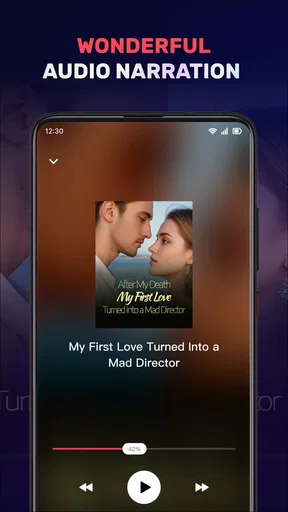
- No audiobook integration currently available.
- Requires internet for initial book download.
FAQs for NovelMaster
What is NovelMaster and what features does it offer?
NovelMaster is an innovative app designed for avid readers and writers. It offers a vast library of novels across various genres, along with features like bookmarking, offline reading, and customizable reading modes. Users can also write and publish their own stories, participate in writing contests, and engage with a community of fellow literature enthusiasts.
Is NovelMaster free to use, and are there any in-app purchases?
While NovelMaster can be downloaded for free and provides access to a wide range of free content, it also offers premium features via in-app purchases. These might include ad-free reading, exclusive novels, and additional customization options. Users can choose a subscription plan that best suits their reading habits and preferences.
What platforms is NovelMaster available on, and is it easy to navigate?
NovelMaster is available on both Android and iOS platforms. The app's interface is user-friendly, with intuitive navigation that makes it easy to browse novels, manage your library, and explore new content. Whether you're a tech-savvy reader or new to digital reading, you'll find the app straightforward and enjoyable to use.
Does NovelMaster support offline reading, and how can I download books?
Yes, NovelMaster supports offline reading, allowing users to download books to their devices and read them without an internet connection. Simply select the novel you wish to download, and use the download option available within the app. This is particularly handy for reading on-the-go, during travel, or in areas with limited connectivity.
How does NovelMaster ensure content quality and user interaction?
NovelMaster maintains content quality through a diligent editorial process and user reviews. Authors can submit their works for publication, which undergo evaluation by a panel of editors. Users can rate and review novels, providing feedback that helps maintain high standards. The app also fosters interaction through community forums and discussion groups.


